802.11w PMF Required, decoded frame by frame, live attack, live capture, and exactly where protection gets negotiated inside the RSN Information Element.
Key Takeaways
- PMF protects Deauthentication, Disassociation, and Action frames from forgery. It does not encrypt Beacon or Probe Response frames, those remain readable in any capture (IEEE, “IEEE Std 802.11w-2009”).
- PMF negotiation lives in the RSN IE: bit 6 = MFPC (Management Frame Protection Capable) and bit 7 = MFPR (Management Frame Protection Required) inside RSN Capabilities (IEEE, “IEEE Std 802.11-2020”).
- WPA3-Personal (SAE) and WPA3-Enterprise mandate PMF Required by spec. Any Association Request that does not set MFPC=1 is rejected at the AP (IEEE, “IEEE Std 802.11-2020”).
- Unicast protected management frames use the existing PTK. Broadcast management frames use a separate IGTK protected with BIP-CMAC-128 (IEEE, “IEEE Std 802.11w-2009”).
- A deauth flood against a PMF-Required SSID is silently discarded. The client and AP exchange SA Query frames over the protected channel to verify the legitimate session is intact (IEEE, “IEEE Std 802.11-2020”).
Contents
- Why Deauth Attacks Still Work (On Networks Without PMF)
- How 802.11w PMF Works
- What PMF Protects, and What It Doesn’t
- RSN Information Element: Decoding the PMF Bits
- PMF Mode Comparison
- Lab Setup
- Scenario 1: Deauth Attack Without PMF
- Scenario 2: Deauth Attack With PMF Required
- Scenario 3: Deauth Attack Against PMF-Capable Client Without Enforcement
- WPA2 vs. WPA3 PMF Behavior
- Deployment Guidance
- Works Cited
1. Why Deauth Attacks Still Work (On Networks Without PMF)
802.11 management frames are unauthenticated. Any station within RF range can attempt a deauthentication or disassociation attack against a connected client. The target has no mechanism to distinguish a legitimate deauthentication frame from the AP from one with a spoofed source MAC, because the 802.11 frame header carries no cryptographic signature, no sequence integrity check, and no binding to the session keys established during authentication. The BSSID field is just a value in a header, and anyone can write whatever they want into it (IEEE, “IEEE Std 802.11-2020”).
This is what makes aireplay-ng --deauth so effective. A free Kali Linux distro,
a cheap wireless adapter, and a single command is all it takes. No password. No credentials.
No knowledge of the network beyond the BSSID. It does not matter whether the target is
running WPA2-Personal or WPA2-Enterprise with full 802.1X authentication, the
certificate and the PSK protect data frames. Management frames are on their own, and
without PMF, they are completely exposed.
A WPA2-Enterprise SSID with 802.1X, PEAP-MSCHAPv2, and a valid certificate is fully vulnerable to a deauth flood. The encryption protecting data frames does nothing for management frames.
2. How 802.11w PMF Works
Protected Management Frames extends cryptographic protection to a specific class of management frames called Robust Management Frames. Rather than a new key hierarchy, PMF reuses the session keys already established during the EAPOL four-way handshake (IEEE, “IEEE Std 802.11w-2009”).
Unicast Protected Management Frames
Individually addressed Deauthentication, Disassociation, and Action frames are protected with the Pairwise Transient Key (PTK), the same key already driving CCMP or GCMP on data frames. The Protected Frame bit (bit 6 of Frame Control) is set to 1, and the frame carries a full CCMP or GCMP header. An attacker cannot forge a valid protected deauth without the PTK, which never crosses the wireless medium (IEEE, “IEEE Std 802.11w-2009”).
Broadcast and Multicast Protected Management Frames
The PTK is a per-client unicast key and cannot protect group-addressed frames. PMF introduces a dedicated key called the Integrity Group Temporal Key (IGTK), distributed to all clients during EAPOL Message 3/4 as a Key Data Encapsulation (KDE) element. Broadcast Robust Management Frames are integrity-checked with BIP-CMAC-128, which appends a Message Integrity Check Element (MMIE) to the frame. BIP provides integrity, not confidentiality, the content of broadcast management frames remains readable in a capture, but forgery becomes detectable (IEEE, “IEEE Std 802.11w-2009”).
Unicast management frames (deauth to a specific client) → PTK, full CCMP/GCMP encryption, Protected Frame bit = 1.
Broadcast management frames (deauth to broadcast DA) → IGTK + BIP-CMAC-128, integrity only, MMIE appended. Both paths require PMF negotiation via the RSN IE.
The SA Query Procedure
When a PMF-capable client receives an unprotected Disassociation or Deauthentication frame, exactly what a deauth attack generates, it does not immediately disconnect. Instead it initiates the Security Association (SA) verification procedure: it sends an SA Query Request to the AP over the protected channel. If the AP responds with a valid SA Query Response (also protected), the session is confirmed intact and the forged frame is discarded. If no valid response arrives within the timeout window, the client proceeds with disassociation (IEEE, “IEEE Std 802.11-2020”).
3. What PMF Protects, and What It Doesn’t
The table below categorizes 802.11 management frame types by their PMF protection status, as defined in the IEEE specifications (IEEE, “IEEE Std 802.11w-2009”; IEEE, “IEEE Std 802.11-2020”).
| Frame Type | PMF Protected? | Notes |
|---|---|---|
| Deauthentication (unicast) | Yes | Protected with PTK via CCMP/GCMP. Protected Frame bit = 1. |
| Disassociation (unicast) | Yes | Protected with PTK via CCMP/GCMP. |
| Action frames (unicast) | Yes | Includes SA Query, Block Ack, Radio Measurement, Spectrum Management. |
| Deauthentication (broadcast) | Yes | Integrity only: IGTK + BIP-CMAC-128, MMIE appended. Content still visible. |
| Beacon frames | No | Not protected. RSN IE (including PMF bits) visible to any passive listener. |
| Probe Request / Response | No | Pre-association exchange. No session keys exist yet. |
| Authentication frames | No | Pre-association. PMF protection begins after the four-way handshake completes. |
| Association Request / Response | No | Where PMF is negotiated via RSN IE, it is not yet active. |
PMF does not hide the SSID, BSSID, supported AKMs, or RSN capabilities from a monitor-mode adapter. An attacker can see that PMF Required is set. What they cannot do is forge a management frame and have it accepted by a PMF-enabled client or AP.
4. RSN Information Element: Decoding the PMF Bits
PMF capability and requirement are communicated through the RSN Information Element (IE Tag 48), present in Beacon, Probe Response, Association Request, and Reassociation Request frames. Within the RSN IE, the 2-byte RSN Capabilities field carries the two bits that govern PMF (IEEE, “IEEE Std 802.11-2020”):
| Bit | Name | Abbrev. | Meaning When Set |
|---|---|---|---|
| 6 | Management Frame Protection Capable | MFPC | Device supports PMF. Required on both AP and client for any PMF to function. |
| 7 | Management Frame Protection Required | MFPR | Device mandates PMF. AP rejects any Association Request where client MFPC = 0. |
What It Looks Like in Wireshark
In any Beacon from PMF_Required, expand Tagged Parameters → RSN Information (Tag 48) → RSN Capabilities. The lab capture below shows exactly what to look for (IEEE, “IEEE Std 802.11-2020”):

wlan.bssid == 5c:64:f1:bf:4b:eb && wlan.fc.type_subtype == 0x08
Even if MFPC and MFPR bits are set, broadcast management frame protection is only active
if the Group Management Cipher Suite field is present in the RSN IE and
reads 00:0f:ac (IEEE 802.11) BIP (128). If this field is absent, broadcast
deauth/disassoc frames are not integrity-protected despite the capability bits.
5. PMF Mode Comparison
| PMF Mode | AP MFPC | AP MFPR | Client Must Advertise MFPC? | Legacy (Non-PMF) Clients Allowed? | WPA3 Compatible? |
|---|---|---|---|---|---|
| Disabled | 0 | 0 | No | Yes | No |
| Optional | 1 | 0 | No | Yes | No |
| Required | 1 | 1 | Yes | No | Yes |
PMF Optional allows both PMF-capable and legacy clients to connect. A PMF-capable client negotiates protected management frames; a legacy client does not. This means partial protection: an attacker targeting any legacy client on that SSID can still deauth it successfully. PMF Required is the only mode that eliminates the deauth attack surface entirely for all clients on that SSID (IEEE, “IEEE Std 802.11w-2009”).
6. Lab Setup
My lab setup consists of a Kali Linux instance running an Alfa AWUS036ACH 802.11ac (Wi-Fi 5) adapter in monitor mode, statically set to Channel 36 (5180 MHz) on a 20 MHz channel width. Infrastructure is a Cisco Catalyst 9800-L WLC on 17.15.4d code behind a Cisco 3560X PoE+ switch, one Cisco Catalyst 9166 AP (Cisco Systems, Catalyst 9800 Series Wireless LAN Controller Security Configuration Guide). Test client is a Samsung Galaxy S25+.
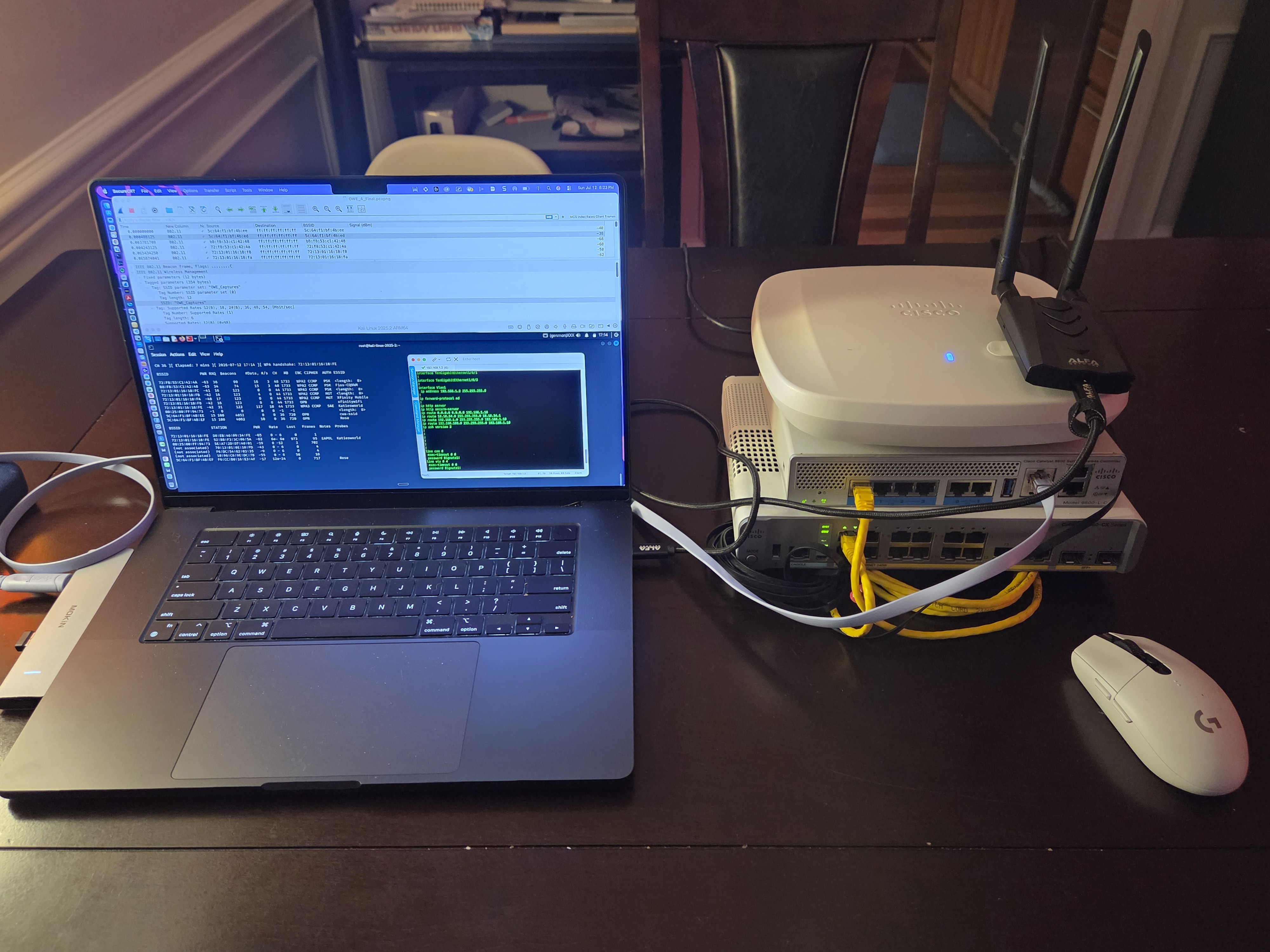
aireplay-ng active on screen.
Right side, top to bottom: Cisco Catalyst 9166 AP, Cisco Catalyst 9800-L WLC, Cisco 3560X PoE+ switch.
Alfa AWUS036ACH adapter plugged in, antenna up, Channel 36 locked. Everything you see in the
captures and videos came off this table.
Three SSIDs are configured on the same AP, same 5 GHz radio, same Channel 36. Keeping everything on one channel means the Alfa catches all three without channel-hopping:
| SSID | Security | PMF Mode | What It Proves |
|---|---|---|---|
| PMF_Disabled 5c:64:f1:bf:4b:ed |
WPA2-PSK | Disabled | Baseline, deauth flood works, client disconnects, no SA Query fires |
| PMF_Optional 5c:64:f1:bf:4b:ec |
WPA2-PSK | Optional | MFPC=1, MFPR=0 in Beacon; PMF-capable clients protected, legacy clients still vulnerable |
| PMF_Required 5c:64:f1:bf:4b:eb |
WPA3-SAE | Required | MFPC=1, MFPR=1; SA Query fires on forged deauth, flood has no effect, client stays associated |
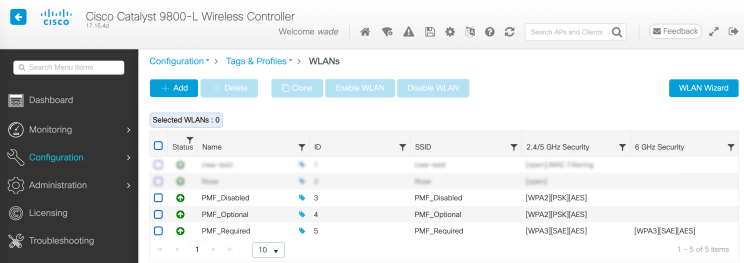
7. Scenario 1: Deauth Attack Without PMF
First thing we do is prove the problem is real. PMF_Disabled is a plain WPA2-PSK SSID with no PMF. Management frames are wide open. This is what that looks like on the 9800:

Connect the Samsung to PMF_Disabled and run the flood:
# AP BSSID: 5c:64:f1:bf:4b:ed  (Cisco 9166, PMF_Disabled)
# Samsung Galaxy S25+:          f6:dc:54:62:03:35
aireplay-ng --deauth 0 -a 5c:64:f1:bf:4b:ed -c f6:dc:54:62:03:35 wlan0
The Samsung drops. In Wireshark, filter for deauthentication frames on PMF_Disabled:
wlan.bssid == 5c:64:f1:bf:4b:ed && wlan.fc.type_subtype == 0x0c

Frame 6372 through 6389, same ~60ms window, all identical:

  Type/Subtype: Deauthentication (0x000c)
  Frame Control Field: 0xc000          ← Protected Frame bit = 0
  Transmitter: Cisco_bf:4b:ed (5c:64:f1:bf:4b:ed)  ← aireplay spoofing the AP
  Receiver:    f6:dc:54:62:03:35               ← Samsung Galaxy S25+
  Sequence Number: 126 ... 126 ... 126 ... 126  ← same SN repeated = injected
  Reason Code: 0x0006  ← "Class 2 frame from nonauthenticated STA"

Frames 9423–9433: SN resets to 131, same pattern repeats.
No SA Query. No Action frames. No protection. Client dropped clean.

wlan.bssid == 5c:64:f1:bf:4b:ed && wlan.fc.type_subtype == 0x0c && wlan.fc.protected == 0.
Every frame in the list is an unprotected Deauthentication. Source is the spoofed AP BSSID.
Sequence number 126 repeats across 16 consecutive frames, the injected packet signature.
Reason Code 0x0006. No SA Query. No protection. Samsung Galaxy S25+ dropped clean.
aireplay-ng --deauth on the left, Samsung Galaxy S25+
screen on the right via scrcpy. The Samsung drops on command. No credentials.
No knowledge of the network beyond the BSSID (IEEE, “IEEE Std 802.11-2020”).
A few things worth pointing out in that capture. The source address on every frame is the AP’s own BSSID, 5c:64:f1:bf:4b:ed, because aireplay-ng spoofs the AP to make the Samsung think it is being kicked by the infrastructure itself. The Samsung has no way to verify that. The sequence number repeating at 126 across sixteen consecutive frames is the dead giveaway that these are injected, not real, a legitimate AP increments the sequence number on every frame. And the reason code 0x0006 is the default aireplay-ng value. None of this requires a password, a certificate, or any knowledge of the network. Just the BSSID and the target MAC (IEEE, “IEEE Std 802.11-2020”).
Run the same flood against PMF_Optional. If the test client advertises PMF support, the SA Query will fire and it stays connected. But connect any legacy device, an older laptop, an IoT sensor, anything that does not set MFPC=1, and it drops just like Scenario 1. Optional means partial. It is better than nothing, but it is not a fix (IEEE, “IEEE Std 802.11w-2009”).
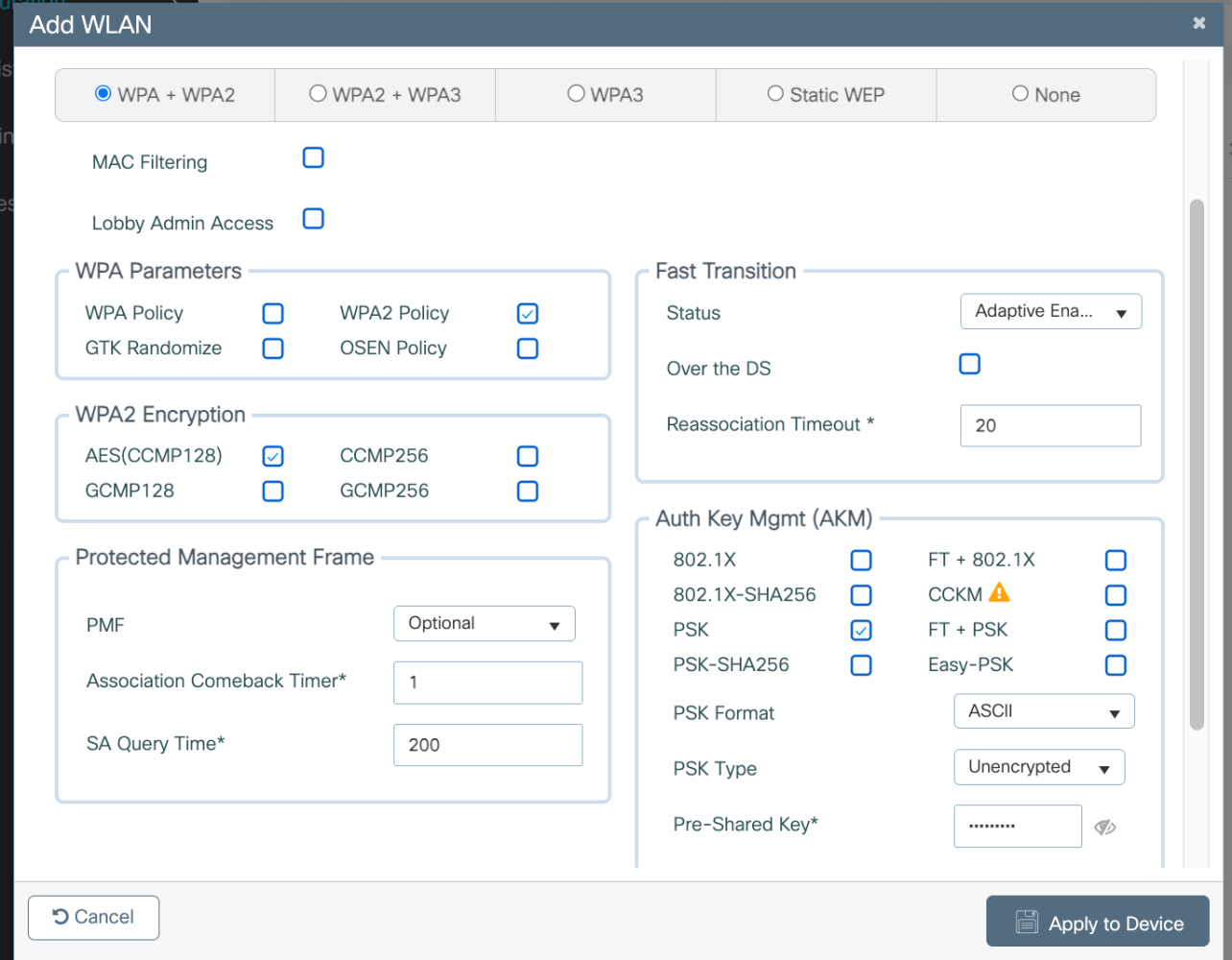
8. Scenario 2: Deauth Attack With PMF Required
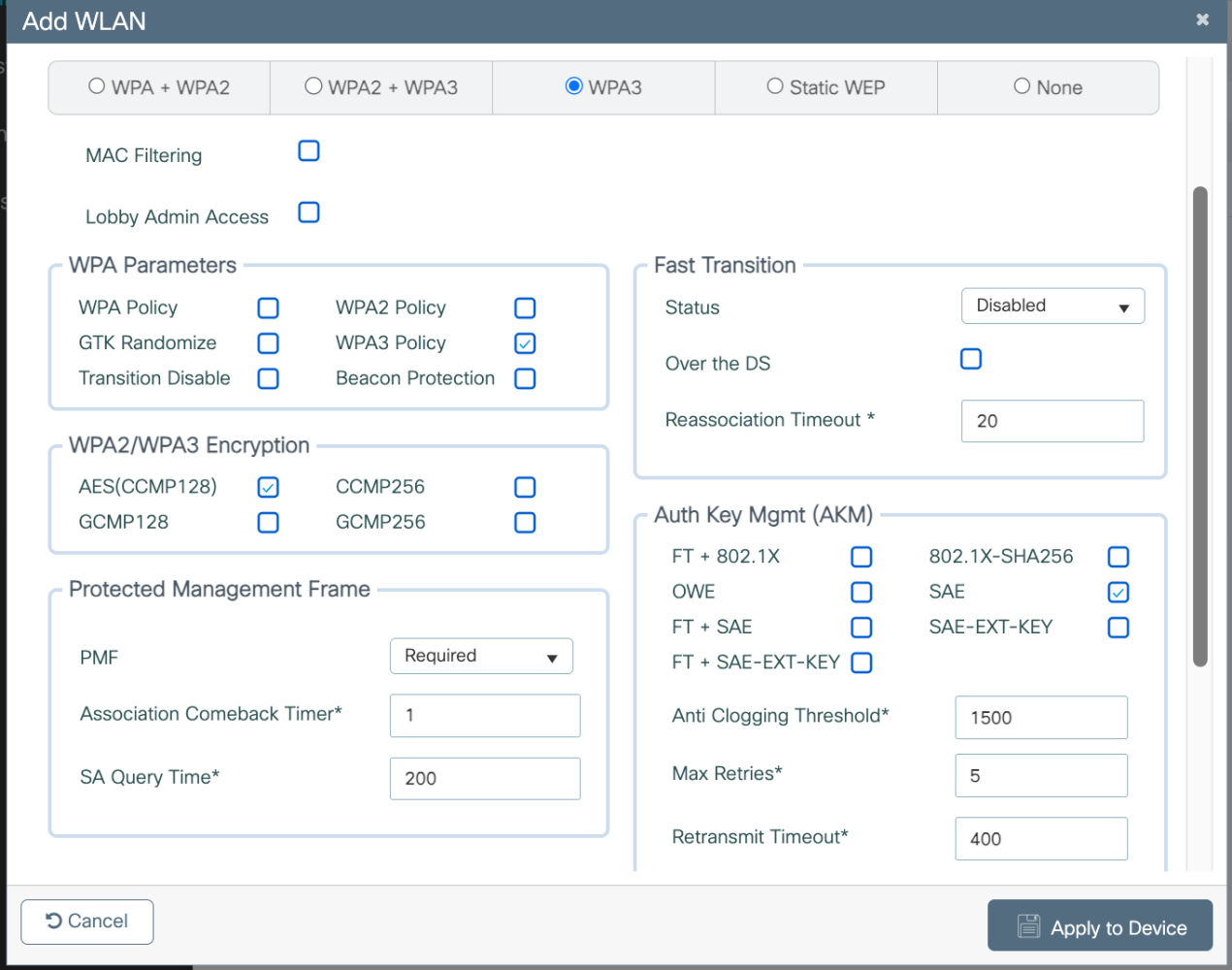
Now connect the test client to PMF_Required. Do not run any attack yet. Just associate normally and capture the whole process. PMF is not something you turn on after the fact, it gets negotiated in three specific places during the association itself (IEEE, “IEEE Std 802.11w-2009”). Here is the configuration that makes it happen:
Step 1, The Beacon Announces It
The AP advertises PMF support in every Beacon frame before any client shows up. Filter for Beacons from PMF_Required:

wlan.bssid == 5c:64:f1:bf:4b:eb && wlan.fc.type_subtype == 0x08
wlan.bssid == 5c:64:f1:bf:4b:eb && wlan.fc.type_subtype == 0x08

Expand: Tagged Parameters → RSN Information (Tag 48) → RSN Capabilities

.... .... 1... ....  = Management Frame Protection Capable:  Capable   ← MFPC, bit 6
.... ...1 .... ....  = Management Frame Protection Required: Required  ← MFPR, bit 7

Scroll past PMKID List:
Group Management Cipher Suite: 00:0f:ac (IEEE 802.11) BIP (128)
← Confirms broadcast management frame protection is active (IEEE Std 802.11w-2009)
Step 2, The Client Agrees to It
When the Samsung sends its Association Request to PMF_Required, it does not just advertise PMF support, it sets both MFPC=1 and MFPR=1. On WPA3-SAE, a modern Android client goes further than “I can do PMF” and says “I require PMF too.” Also notice the Group Management Cipher Suite: BIP (128) is present in the client’s own RSN IE, explicitly advertising broadcast management frame protection capability. This is full WPA3 client behavior (IEEE, “IEEE Std 802.11-2020”; Wi-Fi Alliance, “WPA3 Specification”).
Note the new randomized MAC: the Samsung used f6:dc:54:62:03:35 on PMF_Disabled and switched to 82:c5:bc:bd:21:c5 on PMF_Required. Android assigns a unique stable randomized MAC per SSID by default.
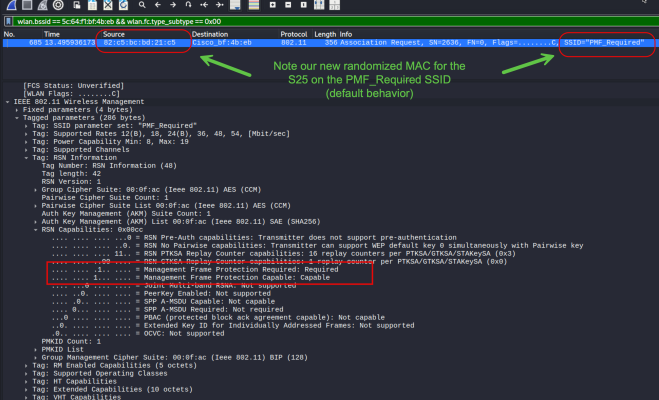
The Samsung Galaxy S25+ runs a Qualcomm Snapdragon 8 Elite for Galaxy
processor with the Qualcomm FastConnect 7900 Wi-Fi system, supporting
Wi-Fi 4 through Wi-Fi 7 (Qualcomm Technologies, Inc.). When Android connects to a WPA3-SAE
SSID with PMF Required, the wpa_supplicant layer sets ieee80211w=2
(required) on the client side as well, which causes both MFPC and MFPR to be
advertised in the Association Request RSN IE. This is correct, documented WPA3 client
behavior. Android’s WPA3 implementation mandates PMF on both ends of the
association, not just the AP side (“WPA3 and Wi-Fi Enhanced Open”). This is WPA3-SAE
client behavior specifically, on WPA2-PMF-Optional, clients typically advertise
MFPC=1 but leave MFPR=0. On WPA3-SAE, modern clients go further and require PMF
bidirectionally.
wlan.bssid == 5c:64:f1:bf:4b:eb && wlan.fc.type_subtype == 0x00

# Frame 685, Samsung Galaxy S25+, MAC: 82:c5:bc:bd:21:c5
Open RSN Information (Tag 48) → RSN Capabilities: 0x00cc

  AKM Suite:  00:0f:ac (IEEE 802.11) SAE (SHA256)      ← WPA3-SAE
  Management Frame Protection Capable:  Capable         ← MFPC = 1
  Management Frame Protection Required: Required         ← MFPR = 1 (WPA3 client sets this)
  Group Management Cipher Suite: 00:0f:ac BIP (128)     ← client advertises BIP support
  PTKSA Replay Counter: 16 replay counters (0x3)         ← modern device

If MFPC = 0 here against a PMF-Required AP:
  Association Response → Status Code 30: ROBUST_MGMT_FRAME_POLICY_VIOLATION
  Association fails. Client cannot connect.
Step 3, The Key That Protects Broadcast Frames Gets Handed Off
In EAPOL Message 3 of 4, the AP hands the client the IGTK, the key used to protect broadcast management frames with BIP-CMAC-128. This is the moment broadcast management frame protection actually activates.
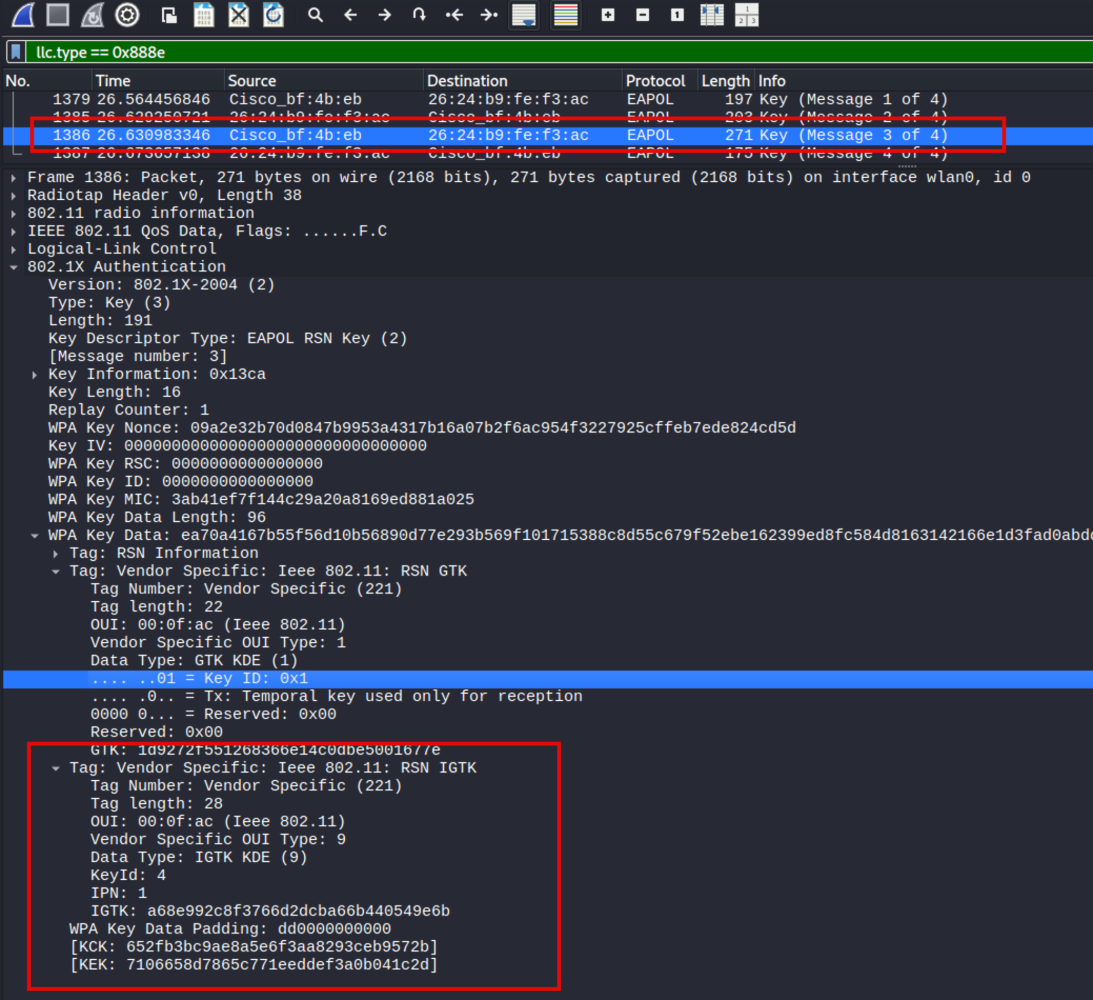
eapol && wlan.bssid == 5c:64:f1:bf:4b:eb

Open EAPOL Message 3 of 4 → WPA Key Data
  Key Data Type: IGTK KDE (OUI 00:0f:ac, Type 9)
  IGTK Key ID:   4          ← IGTK IDs start at 4; GTK IDs are 1–3
  IPN:           [6 bytes]   ← Integrity Packet Number, anti-replay counter
  IGTK:          [16 bytes]  ← The BIP-CMAC-128 key for broadcast frames (IEEE Std 802.11w-2009)
WPA2-PMF-Optional vs. WPA3-SAE: RSN Capabilities Side by Side
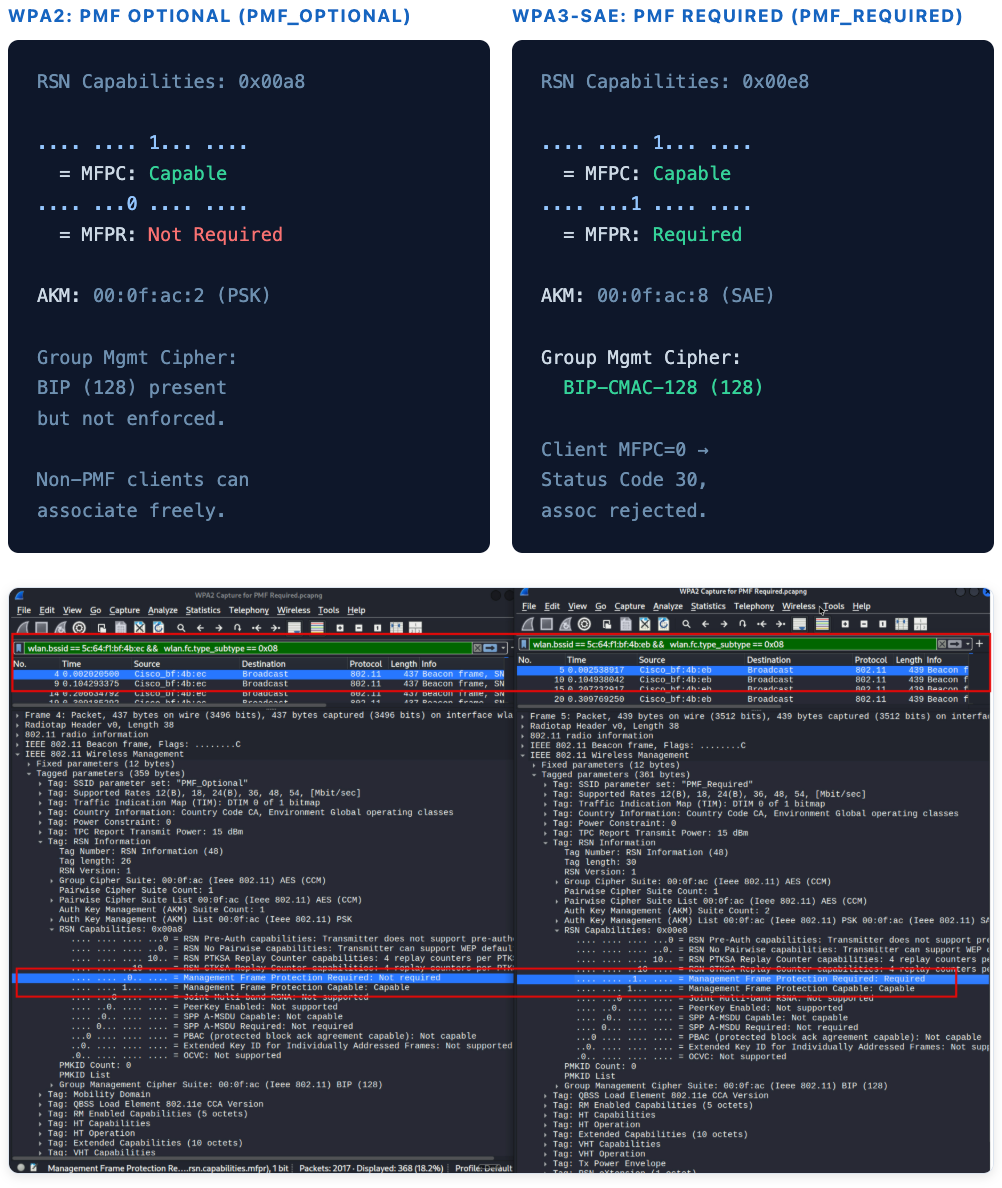
Capture a Beacon from each SSID type and look at the same RSN Capabilities field. The difference comes down to one bit and one AKM suite (IEEE, “IEEE Std 802.11-2020”; Wi-Fi Alliance, “WPA3 Specification”):
RSN Capabilities: 0x00a8

.... .... 1... ....
  = MFPC: Capable
.... ...0 .... ....
  = MFPR: Not Required

AKM: 00:0f:ac:2 (PSK)

Group Mgmt Cipher:
BIP (128) present
but not enforced.

Non-PMF clients can
associate freely.
RSN Capabilities: 0x00e8

.... .... 1... ....
  = MFPC: Capable
.... ...1 .... ....
  = MFPR: Required

AKM: 00:0f:ac:8 (SAE)

Group Mgmt Cipher:
  BIP-CMAC-128 (128)

Client MFPC=0 →
Status Code 30,
assoc rejected.
9. Scenario 3: Deauth Attack Against PMF-Capable Client Without Enforcement
Run the exact same attack as Scenario 1. Same command. Same Alfa adapter. Same channel. The only difference is the SSID.
# Same command, now targeting PMF_Required
aireplay-ng --deauth 0 -a 5c:64:f1:bf:4b:eb -c 82:c5:bc:bd:21:c5 wlan0
Now filter so you can watch the attack and the defense at the same time:
# Unprotected deauths (attacker) AND SA Query frames (PMF response) together
(wlan.bssid == 5c:64:f1:bf:4b:eb && wlan.fc.type_subtype == 0x0c && wlan.fc.protected == 0) ||
(wlan.bssid == 5c:64:f1:bf:4b:eb && wlan.fc.type_subtype == 0x0d && wlan.fc.protected == 1)

What you will see interleaved in the frame list:
802.11  Deauthentication  [Protected=0]  ← attacker's frame, ignored
802.11  Deauthentication  [Protected=0]  ← another one, ignored
802.11  Action            [Protected=1]  ← SA Query Request  (client → AP)
802.11  Action            [Protected=1]  ← SA Query Response (AP → client)
802.11  Deauthentication  [Protected=0]  ← flood keeps going, client still associated

# Drill into either SA Query Action frame and confirm:
#   Category: 8 (SA Query)
#   Action Code: 0x00 (Request) or 0x01 (Response)
#   Transaction Identifier: same 2-byte value in both frames (IEEE Std 802.11-2020)

(wlan.bssid == 5c:64:f1:bf:4b:eb && wlan.fc.type_subtype == 0x0c && wlan.fc.protected == 0) || (wlan.bssid == 5c:64:f1:bf:4b:eb && wlan.fc.type_subtype == 0x0d && wlan.fc.protected == 1).
Highlighted: 4 protected SA Query Action frames (frames 3299, 3300, 3308, 3481), the client and AP confirming the session is intact. Below: continuous unprotected
Deauthentication flood, all ignored. Samsung Galaxy S25+
(82:c5:bc:bd:21:c5) stayed associated
throughout. The attack failed completely (IEEE, “IEEE Std 802.11w-2009”).
aireplay-ng --deauth command as Video 1.
Wireshark shows the flood running and SA Query Action frames firing in response.
The Samsung Galaxy S25+ stays connected throughout. The attack does not work.
Compare directly to Video 1, one configuration change, entirely different outcome
(IEEE, “IEEE Std 802.11w-2009”).
The flood runs the whole time. The client does not move. The difference between Scenario 1 and Scenario 3 is three RSN IE bits, one IGTK, and a key exchange that happened 30 seconds earlier during the four-way handshake (IEEE, “IEEE Std 802.11w-2009”).
1. Protected Frame bit = 1 on both the Request and Response. 2. Transaction Identifier matches in both frames, this confirms the AP answered the right query and not a replay. 3. The WLC shows no disconnect event for the client during the flood. All three together are your documented proof that PMF Required stopped the attack (IEEE, “IEEE Std 802.11-2020”).
Wireshark Filter Reference
All discrete display filters used across Scenarios 1, 2, and 3:
| Capture Goal | Wireshark Display Filter |
|---|---|
| All Beacons from AP | wlan.bssid == <ap_mac> && wlan.fc.type_subtype == 0x08 |
| Beacons with PMF Required set | wlan.rsn.capabilities.mfpr == 1 && wlan.fc.type_subtype == 0x08 |
| Beacons with PMF Capable set | wlan.rsn.capabilities.mfpc == 1 && wlan.fc.type_subtype == 0x08 |
| Association Requests from client | wlan.bssid == 5c:64:f1:bf:4b:eb && wlan.fc.type_subtype == 0x00 |
| EAPOL four-way handshake | eapol && wlan.bssid == <ap_mac> • alt: llc.type == 0x888e |
| All deauthentication frames | wlan.fc.type_subtype == 0x0c |
| Unprotected deauths only (attacker) | wlan.fc.type_subtype == 0x0c && wlan.fc.protected == 0 |
| Protected management frames only | wlan.fc.protected == 1 && wlan.fc.type == 0 |
| SA Query Request | wlan.fc.type_subtype == 0x0d && wlan.fixed.action_code == 0x00 |
| SA Query Response | wlan.fc.type_subtype == 0x0d && wlan.fixed.action_code == 0x01 |
| Scenario 3 combined view (attack + defense) | (wlan.fc.type_subtype == 0x0c && wlan.fc.protected == 0) || (wlan.fc.type_subtype == 0x0d && wlan.fc.protected == 1) |
| RSN IE present in any frame | wlan.tag.number == 48 |
10. WPA2 vs. WPA3 PMF Behavior
The IEEE 802.11-2020 consolidated standard and the Wi-Fi Alliance WPA3 Specification together define where PMF is optional versus where it is non-negotiable. The table below maps each security mode to its PMF mandate (IEEE, “IEEE Std 802.11-2020”; Wi-Fi Alliance, “WPA3 Specification”).
| Security Mode | PMF Requirement (Spec) | Default PMF Mode | AKM Suite (OUI:Type) | Notes |
|---|---|---|---|---|
| WPA2-Personal (PSK) | Optional by spec | Optional or Disabled | 00:0f:ac:2 |
PMF not required; depends entirely on AP configuration. |
| WPA2-Enterprise (802.1X) | Optional by spec | Optional or Disabled | 00:0f:ac:1 |
Same as WPA2-Personal. Spec permits PMF Required; most deployments leave it at Optional. |
| WPA3-Personal (SAE) | Required by spec | Required | 00:0f:ac:8 |
IEEE 802.11-2020 mandates MFPR = 1 when SAE AKM is in use. |
| WPA3-Enterprise (802.1X) | Required by spec | Required | 00:0f:ac:5 / 00:0f:ac:12 |
WPA3-Enterprise (128-bit or 192-bit) mandates PMF Required per Wi-Fi Alliance spec. |
| OWE (Enhanced Open) | Required by spec | Required | 00:0f:ac:18 |
OWE mandates PMF Required. Deauth protection is integral to the OWE security model (Harkins and Kumari; Wi-Fi Alliance, “Wi-Fi Enhanced Open Specification”). |
Nothing prevents setting PMF Required on a WPA2-Enterprise SSID today. If your client inventory is post-2014 managed hardware (which virtually every enterprise wireless deployment is), 802.11w support is a given. Enabling PMF Required on existing WPA2-Enterprise SSIDs closes the deauth attack surface without requiring a WPA3 migration. Verify via Association Request captures that MFPC = 1 before committing, a small number of embedded or IoT devices may still fail (Cisco Systems).
11. Deployment Guidance
| SSID Type | Recommended PMF Mode | Rationale |
|---|---|---|
| Corporate 802.1X, WPA3-Enterprise | Required | Mandated by WPA3 spec. All modern enterprise clients support PMF. No exceptions. |
| Corporate 802.1X, WPA2-Enterprise | Required | Post-2014 managed clients support 802.11w. No functional reason to leave this at Optional (IEEE, “IEEE Std 802.11w-2009”). |
| Guest / OWE (Enhanced Open) | Required | OWE mandates PMF Required by spec. This is not configurable; it is inherent to the OWE AKM. |
| WPA3-Personal (SAE) | Required | Mandated by spec. Association will fail for any client that does not set MFPC = 1. |
| WPA2-PSK, Mixed client environment | Optional | Use Optional if legacy devices (pre-2014 IoT, consumer hardware) may not implement 802.11w. Audit the client table first. |
| IoT / Device-only SSID | Optional or Disabled | Many embedded devices do not implement 802.11w. Test before enabling. Disabled is acceptable if the SSID is isolated. |
Cisco Catalyst 9800 Configuration Reference
The following CLI applies to Cisco IOS XE 17.x on the Catalyst 9800 platform (Cisco Systems).
# Check current PMF setting on a WLAN
show wlan id <id> detail | include PMF

# WPA3-SAE with PMF Required (mandatory by spec)
wlan <profile-name> <id> <ssid>
  security wpa akm sae
  security wpa wpa3
  security pmf mandatory
  no shutdown

# WPA2-Enterprise with PMF Required (valid and recommended)
wlan <profile-name> <id> <ssid>
  security dot1x
  security wpa wpa2
  security pmf mandatory    # ← change "optional" to "mandatory"
  no shutdown

# Verify in a capture after applying:
# Beacon RSN IE should show MFPC=1, MFPR=1
# Association Request from client should echo MFPC=1
# EAPOL Message 3/4 Key Data should contain IGTK KDE
After enabling PMF, confirm in a Wireshark capture that the Beacon advertises MFPC = 1 and
MFPR = 1, and that Association Requests from clients echo back MFPC = 1. A misconfigured
policy may apply to the wrong WLAN profile, or a WLC template override may silently undo
what you set. The packet is the ground truth, not the show command.
12. Works Cited
- IEEE. IEEE Standard for Information Technology, Wireless LAN Medium Access Control (MAC) and Physical Layer (PHY) Specifications Amendment 4: Protected Management Frames. IEEE Std 802.11w-2009, Institute of Electrical and Electronics Engineers, 30 Sept. 2009.
- IEEE. IEEE Standard for Information Technology, Telecommunications and Information Exchange Between Systems, Local and Metropolitan Area Networks, Specific Requirements Part 11: Wireless LAN Medium Access Control (MAC) and Physical Layer (PHY) Specifications. IEEE Std 802.11-2020, Institute of Electrical and Electronics Engineers, 26 Feb. 2021.
- Wi-Fi Alliance. WPA3 Specification Version 3.0. Wi-Fi Alliance, 2022, http://www.wi-fi.org.
- Wi-Fi Alliance. Wi-Fi Enhanced Open Specification Version 1.0. Wi-Fi Alliance, 2018, http://www.wi-fi.org.
- Cisco Systems. Catalyst 9800 Series Wireless LAN Controller Security Configuration Guide, Cisco IOS XE 17.15.x. Cisco Systems, 2024, http://www.cisco.com/c/en/us/td/docs/wireless/controller/9800/17-15/config-guide/b_wl_17_15_cg.html.
- Harkins, Dan, and Warren Kumari. “Opportunistic Wireless Encryption.” RFC 8110, Internet Engineering Task Force, Mar. 2017, http://www.rfc-editor.org/rfc/rfc8110. See also: Kumari, Warren, and Dan Harkins. “Transferring Opportunistic Wireless Encryption to the IEEE 802.11 Working Group.” RFC 9672, IETF, 2024, http://www.rfc-editor.org/info/rfc9672.
- Qualcomm Technologies, Inc. “Snapdragon 8 Elite Mobile Platform.” Qualcomm, http://www.qualcomm.com/smartphones/products/8-series/snapdragon-8-elite-mobile-platform. Accessed 13 July 2026.
- “WPA3 and Wi-Fi Enhanced Open.” Android Open Source Project, Google, 17 June 2026, source.android.com/docs/core/connect/wifi-wpa3-owe.