
Squeezing the Most Out of Our 5 GHz SSIDs: Optimizing During the 6 GHz Migration Era
6 GHz is coming, but 5 GHz is still carrying your network. Here is how I tune it before clients even associate.
Overview
As 6 GHz rolls out, 5 GHz remains our primary band. With deliberate configuration, it still delivers superior performance compared to 2.4 GHz. These are the RF and QoS optimizations I implement to maximize 5 GHz efficiency before clients even associate.
The Evolution of 5 GHz: From Legacy to Premium
We spent years migrating clients from 2.4 GHz to 5 GHz. Now we’re seeing the same pattern repeat as 6 GHz emerges: 5 GHz will inherit every client that can’t reach or won’t roam to the new band. The key difference: properly tuned 5 GHz still outperforms 2.4 GHz in ways that 2.4 GHz never could.
DFS Channel Strategy: Maximizing Spectrum Efficiency
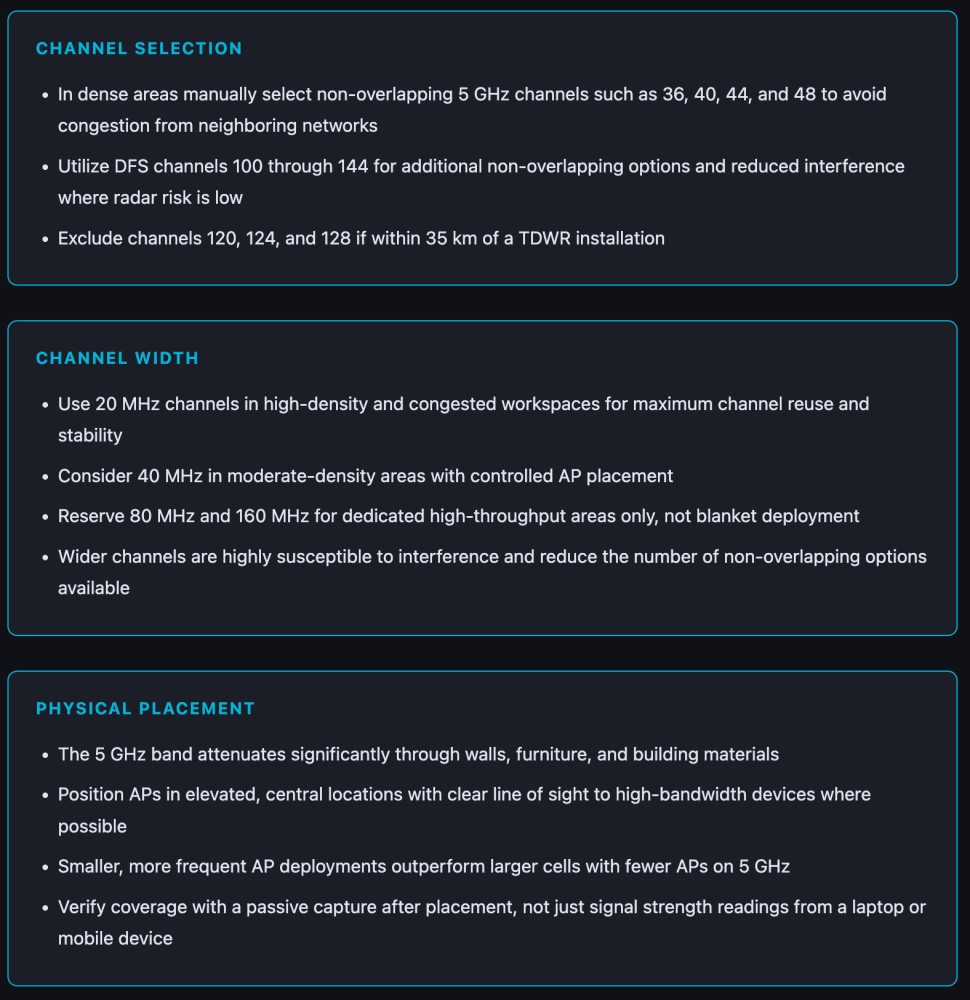
The U.S. 5 GHz band comprises four UNII sub-bands, with most deployments defaulting to only UNII-1 and UNII-3. This leaves 15 additional non-overlapping DFS channels unused. DFS channels (52-144) add 15 more non-overlapping 20 MHz channels, directly reducing co-channel interference in dense environments (Nayanajith, “CWAP: 2.4GHz vs 5GHz”).
The tradeoff is real: radar detection events force APs off channels. However, for most indoor enterprise sites away from active radar, I enable DFS channels. The additional capacity proves worthwhile (FCC, “47 CFR § 15.407”).

Navigating TDWR Restrictions: Airport Spectrum Compliance
Channels 120, 124, and 128 (5600-5650 MHz) share spectrum with Terminal Doppler Weather Radar at major U.S. airports. FCC Rule 47 CFR § 15.407 restricts all three within 35 kilometers of TDWR installations. If your site is within 35 km of a major commercial airport, remove these channels from controller channel lists before deployment, don’t wait for the first radar hit (FCC, “47 CFR § 15.407”).
Channel Width Considerations: Balancing Throughput and Capacity
While 80 MHz channels appear impressive on datasheets, they’re problematic in dense deployments. They consume 4x the spectrum of 20 MHz channels, reduce available non-overlapping channels, and increase co-channel interference risk (Access Agility, “MCS Index Table”). I consistently prioritize reliable airtime over theoretical throughput ceilings.
Rate Control: Eliminating Airtime Leeches
Beacon frames and probe responses advertise basic and supported data rates (Nayanajith, “802.11 Mgmt: Beacon Frame”). Clients lingering at coverage edges at 6 Mbps consume airtime that delays all other clients on the same AP. The industry consensus has shifted: the minimum mandatory rate on 5 GHz is now 24 Mbps (Nayanajith, “CWAP: 2.4GHz vs 5GHz”). If a client can’t sustain 24 Mbps, it doesn’t belong on that AP. Let it roam.

Quality of Service: Maintaining Premium Performance
Channel and rate tuning prepare the RF environment before association. QoS determines airtime allocation after connection. On lightly loaded networks, QoS impact is minimal. Under load, however, QoS maintains voice and video usability (Cisco Systems, “Unified Wireless QoS”).
WMM Implementation: Priority-Based Access Control
WMM (Wi-Fi Multimedia) is mandatory for 802.11n and later PHY generations. It defines four Access Categories using EDCA (Wi-Fi Alliance, “WMM”). On WLC implementations, configure off-channel scanning defer for UP priorities 4, 5, and 6 with a 100ms threshold. This prevents APs from wandering to scan mid-call and dropping voice packets (Cisco Systems, “Understand and Troubleshoot QoS over Wireless 9800 WLC”).


Works Cited
- Nayanajith, Rasika. “802.11 Mgmt: Beacon Frame.” mrn-cciew, 8 Oct. 2014, mrncciew.com.
- Nayanajith, Rasika. “CWAP: 2.4GHz vs 5GHz.” mrn-cciew, 15 Oct. 2014, mrncciew.com.
- Access Agility. “MCS Index Table.” mcsindex.com, http://www.mcsindex.com.
- Cisco Systems. “Cisco Unified Wireless QoS.” Enterprise Mobility 3.0 Design Guide, OL-11573-01, Cisco, http://www.cisco.com.
- Cisco Systems. “Understand and Troubleshoot QoS over Wireless 9800 WLC.” Cisco, http://www.cisco.com.
- FCC. “47 CFR § 15.407, General Technical Requirements.” Electronic Code of Federal Regulations, http://www.ecfr.gov.
- Wi-Fi Alliance. “WMM, Wi-Fi Multimedia.” Wi-Fi Alliance, http://www.wi-fi.org.